Fugaku AWS S3 Service Guide
This AWS S3 service on Fugaku allows users to share files in Fugaku’s filesystem. An S3 server will be started as a user’s process when configured buckets are accessed. Users first need to register the path to a directory in the filesystem to share. Then users can create buckets and access keys.
This user guide briefly describes usage of the S3 service on Fugaku. For questions, asking in Zendesk Community is a quickest way to contact maintainers of the service.
An Overview of the Service
This service, Lenticularis-S3 (Lens3), consists of two open-source software, Lens3 + S3 Baby-server. Baby-server is a small S3 server. Multiple S3 server instances run as user’s processes in this service. Lens3 is a multiplexer for the server instances and provides a single access point for them. Lens3 forwards access requests to one of the servers with regard to bucket’s owner.
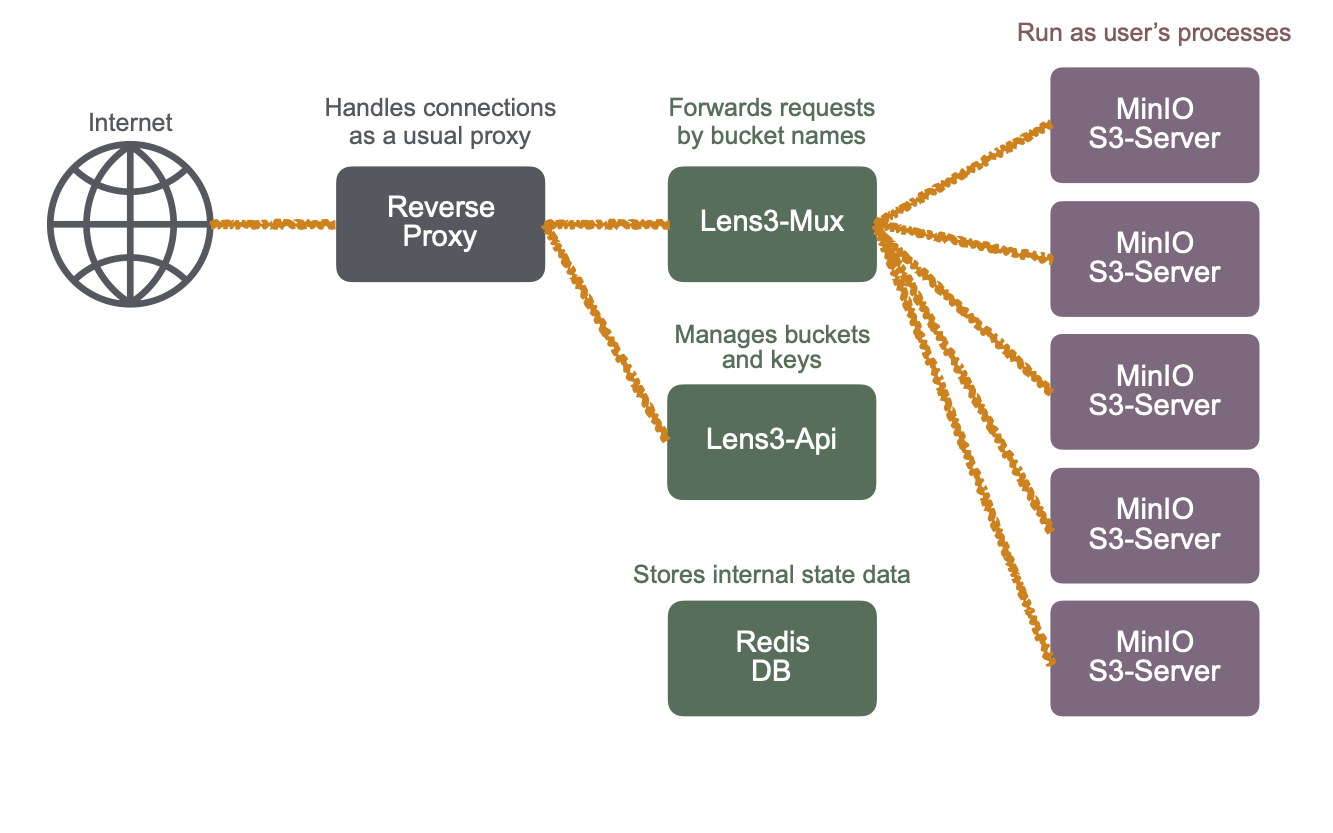
Lens3 does not provide buckets operations, such as listing or creating buckets. Bucket creation is obviously prohibited because Lens3 delivers requests with regard to a bucket (which does not exist yet).
Thus, bucket creatation should be performed in advance. The Web-UI is used to create buckets. In Lens3’s terminology, a pool refers to a directory in the filesystem where buckets are created. Users first create a pool, then create buckets in it.
Quick Setup of Buckets
Instructions in Lens3 Repository
The Lens3’s page in github.com has a good guide of the steps to create buckets. Please refer to it. Bucket names are global, that is, they are shared by all users. Please avoid short commonplace names.
https://github.com/RIKEN-RCCS/lens3/blob/main/v2/doc/user-guide.md
Accessing Buckets by AWS CLI
AWS CLI Installation
An installation instruction of AWS CLI can be found in the following page.
The config file “~/.aws/config” may contain the following lines to specify the AWS S3 signature version (when it is necessary) and a pair of credential:
[default]
s3 =
    signature_version = s3v4
aws_access_key_id = WoRKvRhrdaMNSlkZcJCB
aws_secret_access_key = DzZv57R8wBIuVZdtAkE1uK1HoebLPMzKM6obA4IDqOhaLIBf
The credentials can be created and copied in the Web UI. Note the credentials can be stored in a separate file “~/.aws/credentials”.
Listing files
Try a simple command:
aws --endpoint-url=https://lens3.fugaku.r-ccs.riken.jp s3 ls s3://some-bucket-name/
Replace some-bucket-name with an actual one, as usual. Note that the ‘-’ minus is not a legitimate character in a bucket name.
Uploading files
Then, try a command:
aws --endpoint-url=https://lens3.fugaku.r-ccs.riken.jp s3 cp sample.txt s3://some-bucket-name/
Downloading files
Or, try another command:
aws --endpoint-url=https://lens3.fugaku.r-ccs.riken.jp s3 cp s3://some-bucket-name/sample.txt
Software Components
Lens3: Multiplexer
S3 Baby-server: Small AWS S3 Server
Notes
Note
The service is experimental and currently it is running on a virtual machine using a Lustre-NFS translator. The service is limited to 30 servers at a time (the number of pools simultaneously accessed). It will be upgraded to a more powerful platform when the service will become extensively used.
Access keys in Lens3 have expiration time. In the current setting, the lifetime of access keys is limited to 180 days. It will fail to try to create a key with longer lifettime. (Expiration time is configurable by the site).